
Affiliate Program
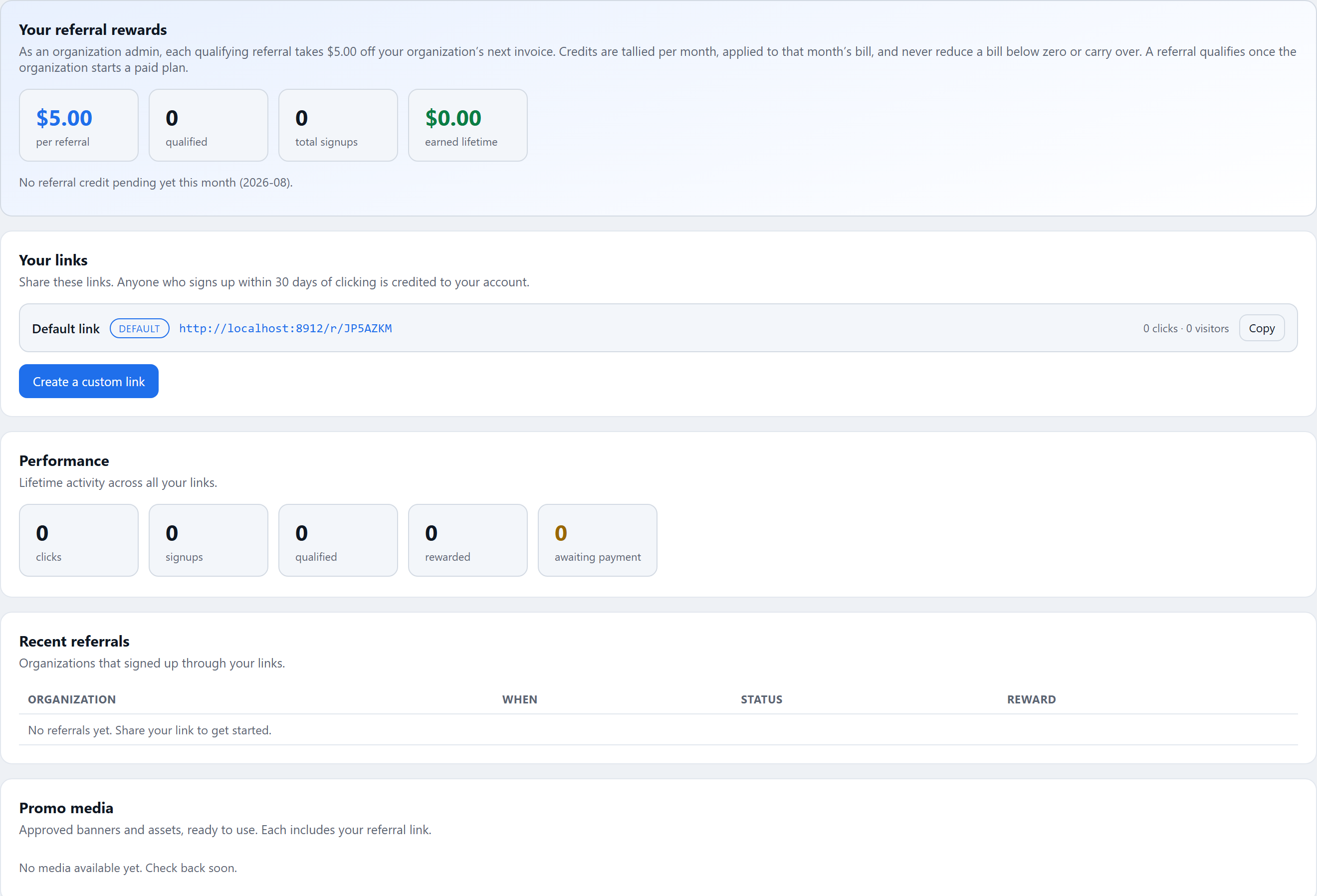
The Affiliate Program page at https://rotorlab.app/affiliate rewards you for bringing new organizations to RotorLab. You share a referral link; when a new organization signs up through it and qualifies, you earn the reward shown on your dashboard. The program may not always be active; when it is not, the page says so and offers a way back to My Account.
Joining#
Where enrollment is open, opening the affiliate page enrolls you and issues your default referral link automatically; there is no application form. Your participation is personal to your account. If your affiliate account is suspended, the page tells you to contact support.
Your links#
The Your links card lists your referral links. Each shows its label, the full URL, and its click and visitor counts, with a Copy button. Your first link is marked default and cannot be deleted.
Anyone who signs up within the attribution window (shown on the card) of clicking your link is credited to your account. Attribution rides on a browser cookie set by the click, and the window runs from the most recent click.
Where offered, press Create a custom link to add more:
- Label: for your own reference ("YouTube", "newsletter").
- Custom code: optional, 3 to 32 letters, numbers, dashes, or underscores. Leave it blank for a random code.
- Send visitors to: the path on rotorlab.app the link lands on (default
/).
Non-default links can be disabled, re-enabled, or deleted. Deleting a link keeps the referrals it already earned.
How referrals qualify and what you earn#
The hero card at the top states your program's exact reward model, because both the amounts and the qualification rule are specific to the current program:
- Organization administrators earn account credit: a fixed amount per qualifying referral, taken off your organization's next invoice. Credit is tallied per month, applied as a discount to that month's bill, and never reduces a bill below zero. Under the program terms, credit beyond what an invoice can absorb is converted to API credits on your organization's balance rather than forfeited.
- Other organization members earn API credits: a fixed number per qualifying referral, added to your organization's credit balance as soon as the referral qualifies.
The card also states when a referral qualifies: either once the referred organization starts a paid plan, or as soon as it signs up, as stated on the card. Self-referrals do not count, and a reward can be reversed if the referred organization's payment is refunded or charged back.
Tracking performance#
The Performance card shows lifetime activity across all your links: clicks, signups, qualified referrals, rewarded referrals, and referrals awaiting payment.
The Recent referrals table lists organizations that signed up through your links, with the date, a status tag, and the reward:
| Status | Meaning |
|---|---|
| pending | Signed up, not yet qualified |
| qualified | Qualified; billing credit accrued for settlement against your next invoice |
| rewarded | Reward delivered |
| reversed or rejected | Referral undone (refund, fraud, or program review) |
For billing rewards, a note under the hero metrics shows the amount pending this month and confirms it will come off your next invoice.
Promo media and terms#
The Promo media card offers approved banners and assets, each pre-wired with your referral link: Copy embed copies ready-to-paste HTML for images and banners, Copy link copies the plain link, and Asset URL copies the raw file address.
When program terms are published, a Program terms card shows them in full at the bottom of the page.