
Community and Achievements
The Community page at https://rotorlab.app/community is where operators share real builds and answer each other's technical questions. The Achievements page at https://rotorlab.app/gamify tracks the XP, levels, badges, and challenges you earn by participating. When either feature is not available to your account, its page says so.
Community#
The hub shows a stat bar (shared builds, questions, answers, questions needing answers, and forks), two tabs (Shared builds and Questions), and a sidebar with questions that need answers and the most forked builds. Each tab has a sort dropdown, a search box, and a tag filter. Reading can be open to everyone; posting is available to organizations on a paid plan. If you cannot post, the page states the reason next to the buttons.
Content posted by RotorLab itself (a featured build of the week, discussion prompts, digests) is always labelled with an explicit RotorLab assistant badge; nothing system-generated pretends to be a person.
Shared builds#
A shared build is a snapshot of a real saved build from your library: its full parameters, a title, a summary, tags, and headline specs (motor count, dry mass, arm length, cell count). The snapshot is immutable, so later edits to your private build do not change what was shared.
To share one, press Share a build, pick a build from your saved builds, give it a title, a summary ("what is it for, what makes it work, real numbers you measured"), and tags, then press Publish. You can also share directly from the build library: setting a build's sharing scope to public publishes it to the community. See Team library.
Whether you may publish is your organization's choice, set by an organization admin under My Account, Organization, Publishing builds to the public community: Any member, Organization admins only, or Nobody: builds stay inside the organization. An organization that is a public body starts at Nobody until its admin chooses otherwise. When the rule does not let you publish, Publish and the public sharing scope are refused with a sentence saying so, for example "Your organization keeps its builds inside the organization. An organization admin can change this under My Account, Organization." Builds already published stay published, and asking questions, answering and commenting are not covered by the rule. See My Account.
A build's detail page shows a Performance card with numbers estimated by RotorLab from the build's parameters, the same numbers you would see in the builder: all-up weight, hover thrust-to-weight, endurance, and more depending on the airframe, plus charts and the limit checks. Below it is a discussion thread.
Press Fork into my library on any shared build to copy it into your own build library as a private starting point. The copy is named after the original with "(fork)" appended.
Questions and answers#
Press Ask a question to post a tagged technical question: a specific title, details ("what is the setup, what happened, what have you ruled out"), and tags. Others post answers; the asker can press Accept on the answer that solved it, which marks the question answered. Both questions and answers take comments.
Everything can be voted up or down with the arrows beside it. You cannot vote on your own posts. A light reputation score appears next to author names, computed from helpfulness (accepted answers and votes received), never from a friend graph.
Achievements#
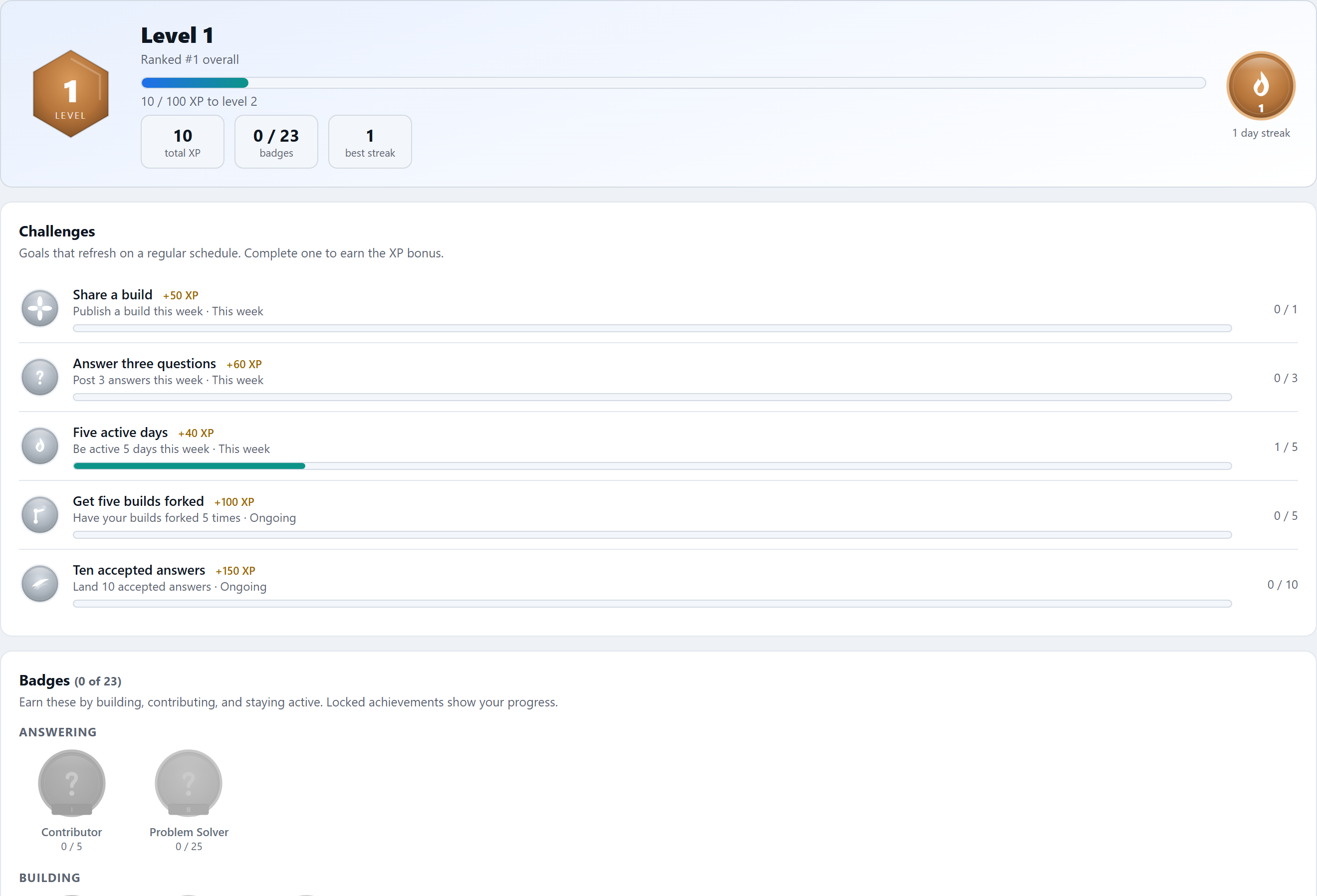
The Achievements page tracks what you earn by building and contributing. Activity in the community (and simply being active each day) awards XP; XP accumulates into levels; specific milestones unlock badges; and rotating challenges pay XP bonuses. When you earn something, a celebration card pops up in place showing the XP, badge, or level you just gained.
XP, levels, and streaks#
The hero card shows your level crest, total XP, a progress bar to the next level, your rank in your organization, badge count, and your daily activity streak (current and best). XP comes from events such as sharing a build, asking a question, posting an answer, having an answer accepted, receiving votes, having your build forked, commenting, and being active on a new day. Each level takes more XP than the last. Repeating the same action on the same target (toggling a vote, re-forking a build) never earns the same XP twice.
Badges#
Badges are grouped into families, and locked badges show your progress toward the threshold:
- Building: sharing builds. Maiden Flight (first build), Builder (5), Master Builder (25).
- Helping: accepted answers. Wingman (1), Mentor (10), Sage (50).
- Answering: answers posted. Contributor (5), Problem Solver (25).
- Asking: questions asked. Curious (1), Investigator (10).
- Recognition: votes received. Liked (10), Respected (50), Legend (200).
- Influence: your builds forked by others. Forked (1), Trendsetter (10), Influencer (50).
- Consistency: daily streaks. Warming Up (3 days), On Fire (7), Unstoppable (30).
- Progression: reaching levels. Rising (level 5), Veteran (10), Elite (25).
- Mastery: total XP. Powerhouse (1000 XP).
Some badges and challenges carry a "Reward:" note; when present, it is shown on the badge and in the unlock celebration.
Challenges#
The Challenges card lists goals that refresh on a schedule, each with a progress bar and an XP bonus for completion. Weekly and monthly challenges reset each period; ongoing challenges run until finished. Examples include sharing a build this week, posting three answers this week, being active five days this week, having your builds forked five times, and landing ten accepted answers.
Leaderboard#
The Leaderboard card ranks the members of your own organization by XP, never anyone else's, with tabs for All time, This week, and This month. An account with no organization sees only itself. When the leaderboard is turned off, the card says so.