
Cloud relay and the agent
The cloud relay reaches a drone over the internet without exposing it. A small agent runs next to the flight controller and dials out to the RotorLab server over WSS; your browser dials out too; the server pairs the two and pumps the raw MAVLink stream between them. The aircraft needs no public address, no open inbound port, and no certificate. The link is keyed to your account, so only your own browsers can join your agent's channel, and the relay never parses the stream, which keeps it firmware-agnostic.
Run the agent anywhere a MAVLink stream is reachable: the aircraft's companion computer, a laptop, the ground-station box, or a cloud SITL host. Any MAVLink source works, since mavlink-router, mavproxy, QGroundControl forwarding, and SITL all expose a UDP or TCP endpoint the agent can read, and the agent can also talk to a flight controller's serial port directly.
Channels#
Sub-channels let one account run several links at once, one per aircraft. The agent picks a label with --channel (default default); on the Live Telemetry page you pick which label to view. A label is a short slug: lowercase letters, digits, and dashes. So --channel stallion and --channel x4 on the same account are two independent channels, each with its own agent and viewers.
If you instead aggregate a fleet into one MAVLink stream (the usual ground-station pattern), leave everything on one channel: the relay carries opaque bytes, and the browser separates aircraft by MAVLink system id.
Get and run the agent#
The agent is a single Python 3 script with no dependencies beyond the standard library. The easiest way to get it is the Download agent script button inside the Cloud relay setup panel on the Live Telemetry page. That panel also prints a ready-to-run command line filled in with the relay address and your chosen channel.
Run the agent next to the flight controller and point it at your MAVLink source. Pick the transport your setup exposes:
# UDP (the usual mavlink-router / mavproxy output)
ROTORLAB_API_KEY=rl_xxx python3 rotorlab_relay_agent.py --udp 127.0.0.1:14550

# TCP (SITL on 5760, or a mavlink-router / mavproxy TCP server)
ROTORLAB_API_KEY=rl_xxx python3 rotorlab_relay_agent.py --tcp 127.0.0.1:5760

# serial flight controller, on a named sub-channel
python3 rotorlab_relay_agent.py --serial /dev/ttyAMA0 --baud 921600 --channel stallion --key rl_xxx
UDP suits mavlink-router or mavproxy output, TCP suits SITL on port 5760 or a proxy TCP server, and --serial (with --baud, default 115200) talks to the board directly.
The agent reconnects on its own with capped backoff (doubling up to a 30-second ceiling), so it is suitable to run as a systemd service that comes up with the aircraft.
Authentication#
The only credential is your API key, taken from the Account page. It is the same key the HTTP API uses. There is no user id to configure: the account behind the key is the channel owner.
Any WebSocket-capable client can authenticate three ways, in this order of preference:
- An
Authorization: Bearer <key>orX-API-Keyheader. The downloaded agent uses this. - The WebSocket subprotocol
Sec-WebSocket-Protocol: rotorlab.v1, key.<key>, for clients (a browser WebSocket, some bridges) that cannot set custom headers. This keeps the key out of URLs and logs. ?key=<key>in the query string. This works everywhere but can end up in logs along the way, so treat it as the last resort.
The browser side#
On the Live Telemetry page, set Connection to RotorLab Cloud relay and enter the Channel label. Before you connect, the Drone agent pill shows whether that channel's agent is currently online, and the channel field suggests channels that have an agent connected. Press Connect.
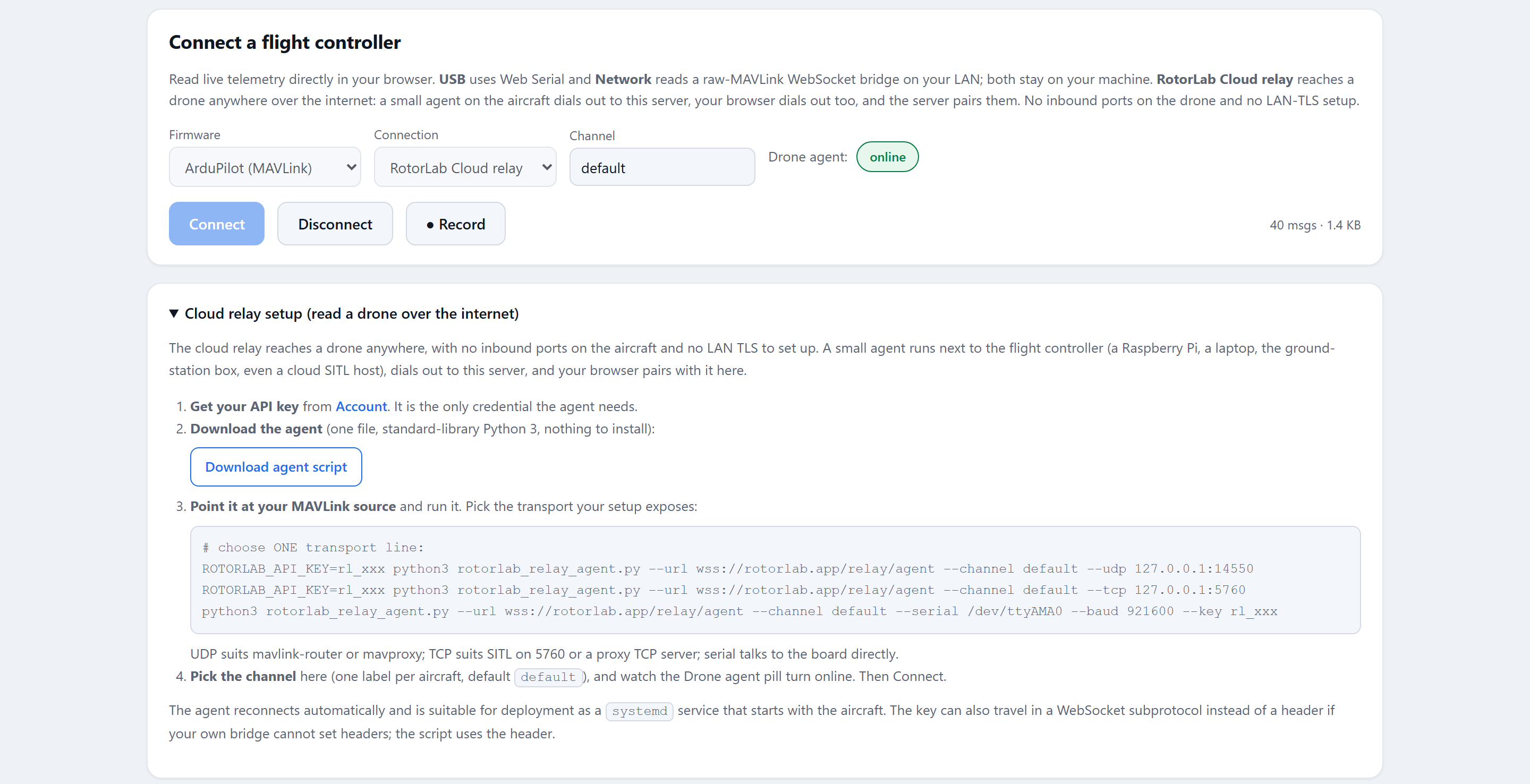
If you connect before the agent is up, the page reports that it is waiting for the drone; telemetry starts flowing the moment the aircraft dials in. If a second browser connects to the same channel, the first one is told that another browser took over the link.
Adapters for anything else: RotorLab telemetry (RLT)#
The relay carries opaque bytes, so it is not limited to MAVLink and MSP. For a source with no byte protocol (a vendor cloud API, a custom tracker, a simulator), an adapter connects to the same /relay/agent endpoint with the same API key and sends RotorLab telemetry: one small JSON object per binary frame, carrying position, attitude, battery, mode, and arm state, with units fixed in the field names. On the Live Telemetry page, pick Any aircraft (RotorLab telemetry) as the firmware and connect through the relay as usual; recording and replay work unchanged.
Fields your source does not report are simply left out, and the cockpit shows the gap rather than a made-up value. RLT links are receive-only: the page never sends anything to an RLT adapter.
The full format and a complete reference adapter that flies a scripted demo flight are on the developers page.
Capacity behavior in plain words#
- Slow viewers are shed, not obeyed. Every connection has a bounded outbound queue. If a viewer's network stalls, the oldest frames are dropped (and counted in the relay status) rather than letting one slow browser hold up telemetry. MAVLink decoders resynchronize on the next frame boundary, so a dropped frame costs a moment of data, not the session.
- Dead connections are reclaimed. The server pings every connection on a fixed interval and force-closes any that stays silent past an idle limit, so a black-holed peer is cleaned up in under a minute instead of holding a socket open.